
Quick answer
Yono is not one app, so “real or fake” has no single answer. Some Yono games are real, free games on Google Play that pay only in virtual coins. Others are cash-game apps and websites that can hold your money. And some APK files that borrow the SBI YONO name are plain scams. The ten checks below tell you which one you are looking at, and most take under a minute. If any app asks you to pay before it lets you withdraw, treat it as fake.
Short mein
Yono koi ek app nahi hai, isliye “real ya fake” ka ek hi jawab nahi hota. Kuch Yono games Google Play par free milte hain aur sirf virtual coins dete hain. Kuch cash-game apps hote hain jahan aapka paisa phans sakta hai. Aur kuch APK files SBI YONO ka naam use karke scam karti hain. Install karne se pehle publisher, Play Store listing aur permissions dekho. Withdraw karne ke liye kabhi paise mat do. Paisa chala gaya ho to turant 1930 par call karo.
Search “Yono games real or fake” and the answers pull in opposite directions. Some pages say every Yono app is a scam. Others say they all pay out. Neither is true. Yono is a name that many unrelated developers have borrowed, so the honest answer has to be given app by app.
This guide shows you how to check any Yono app yourself, with steps that work on any Android phone. It also points to real examples from our own app guides, explains the red flags of a fake Yono APK and says what to do if you have already lost money. You need no technical knowledge, only ten minutes and the name of the app.
Is Yono Games Real or Fake? The Honest Answer
“Yono Games” is not a company, and there is no single official Yono games app. YONO is the name of State Bank of India’s banking app, and game makers borrowed it because people recognise and trust it. We have written a guide for each of the 80 apps on our list, and we found none published by SBI.
So “is Yono real?” is the wrong question. The useful one is: what is this particular app, who runs it, and what happens to my money and my data if I use it? Depending on the app, “real” can mean four very different things, and so can “fake”.
| Kind of app | What it is, and what it can cost you |
|---|---|
| A free game with virtual coins | An app that runs on in-app coins with no cash value, often on Google Play and often offline. It is real as a game, but it will never pay you rupees. Cost: mostly ads, and the disappointment of believing a download page that promised cash. |
| A cash-game platform | An app or website with deposits, bonuses and UPI or bank withdrawals, usually shared as an APK file. Money really does move, but from the outside we cannot verify that payouts work. Cost: your money, plus legal risk (see the law section below). |
| A lookalike | A different product that reuses a popular Yono name, so the page you read and the app you install do not match. Cost: you install something you never meant to. |
| A scam APK | A file built to take something from you: OTPs, banking logins, Aadhaar details or a “fee” to release winnings. It often arrives by SMS, WhatsApp or Telegram, and sometimes dresses up as SBI YONO. Cost: money and identity data. |
Everything below is about telling these four apart.
Same Yono Name, Different App: Real Examples
The quickest way to see the problem is to look at names where we have found two different things under one title.
| App name | One name, two stories |
|---|---|
| Yono Rummy | The app on Google Play is an offline Indian Rummy game whose listing says it uses virtual coins and no real money. Elsewhere the same name is used to sell real-money rummy and Ludo with add-cash bonuses and UPI withdrawals. |
| Yono Arcade | Despite the name, it is an offline rummy game, and its developer says it involves no real money, gambling or cash rewards. Other pages use the name for a ₹290 sign-up bonus, 25+ real-money games and cash tournaments. |
| Yono VIP | A light scratch-and-spin game whose coins never leave the app. Other sites describe a cash-games service under the same name, and some even call it safe “because it comes from SBI”. It has no link to SBI. |
| IND Bingo | A free Google Play collection of 15+ mini-games that pays out only virtual coins, and none of them is number bingo. A cash-games website with “60+ games” uses the same name. |
| Yono Games | A small card game on Google Play, rated Teen with a Simulated Gambling label, whose listing never mentions deposits or withdrawals. A separate real-money website shares the name. |
Yono Slots is the reverse case. Its own pages describe a real-money platform, so our guide looks at what players report and at the legal risk instead. In every one of these examples the name told you nothing. The publisher, the store listing and the app’s own rules told you the truth, and those are what the checks below look at.
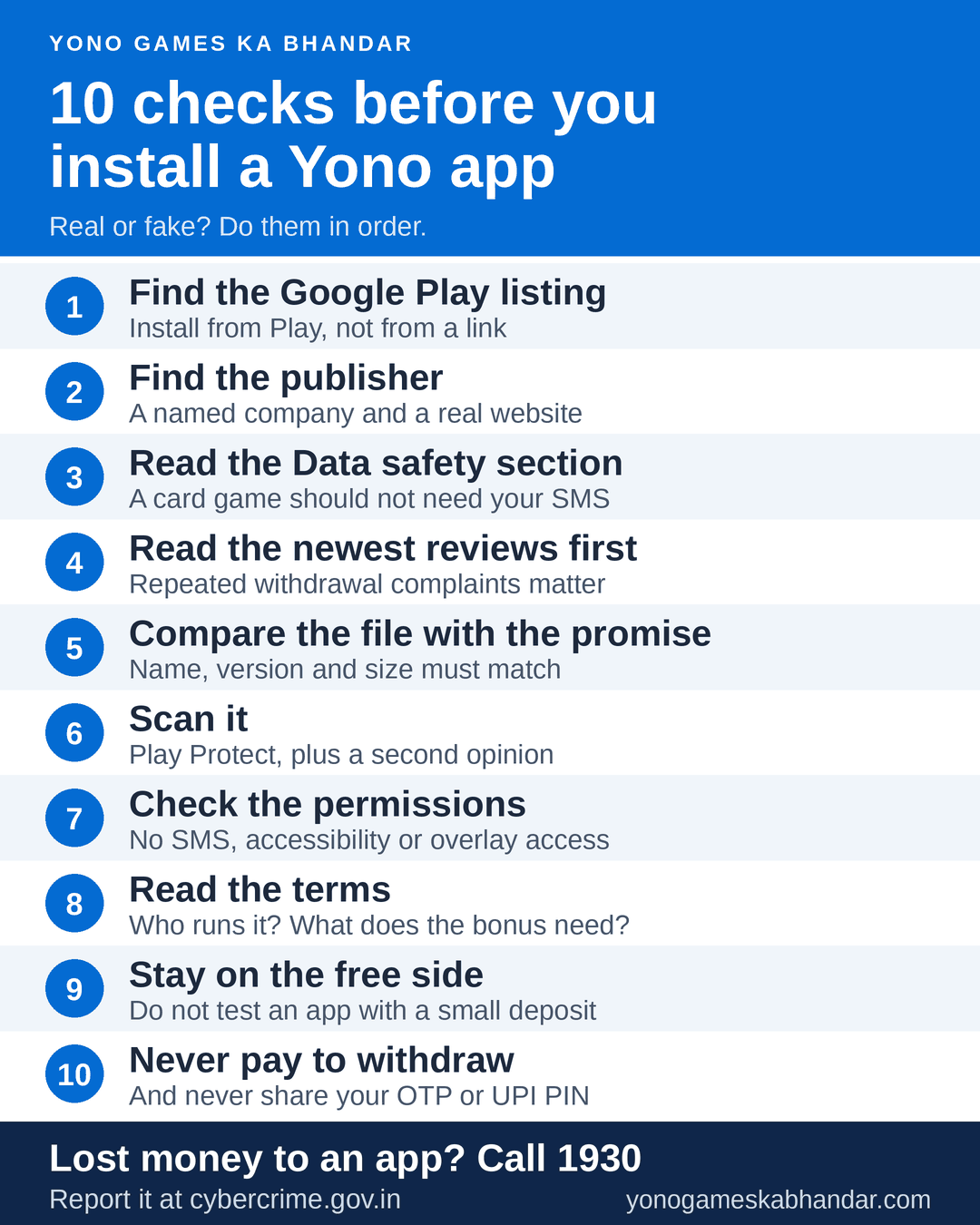
How to Check Any Yono App: 10 Checks Before You Install
These checks work for any Android app, not only Yono ones. Do them in order. An app that fails one of the first four can be dropped before you download anything.
Before you download (checks 1 to 4)
- Look for the Google Play listing. Search the exact app name on Google Play. If the app is there, install it from Play and not from a link. A listing gives you a named publisher, a rating, recent reviews, a content rating and a data-safety section, and a file from a link gives you none of these. An app missing from Play is not automatically fake, but every check that relies on the store disappears, so the other checks matter more.
- Find the publisher and open its website. The developer’s name sits under the app title. Scroll down to App support for its email, website and privacy policy. A genuine publisher usually has a working website, a privacy policy that names the company and a way to contact it. Treat a dead website, or a policy that never says who the company is, as a warning.
- Read the Data safety section. It lists the data the developer says the app collects and shares. A casual card game that collects your contacts, messages or exact location is asking for more than it needs. The developer fills this section in, so it is a claim and not a certificate (Google explains how it works).
- Read the newest reviews first. Sort by newest and read the 1-star and 2-star reviews before the 5-star ones. Look for the same complaint from different people, such as “withdrawal not received”, “account blocked” or “asked for money”. Then search the app’s name with “withdrawal” and “scam” on Reddit and Trustpilot. A wave of near-identical five-star reviews in the same week is a warning, not a recommendation.
Once the file is on your phone (checks 5 to 7)
- Compare the file with the promise. Check the name, version and size against what the download page said. A “full casino with 50+ games” that arrives as a few hundred KB may only be a loader that fetches something else later, and a file named after KYC or an Aadhaar update is not a game at all. If the details do not match, delete the file.
- Scan it. Open Google Play, tap your profile picture, choose Play Protect and run a scan (how Play Protect works). For a file that came from a link you can also check it with a free multi-engine scanner such as VirusTotal. A clean result is a second opinion, not a promise that the app is honest, because most of what makes a cash-game app risky is not a virus. If Android had you allow installs from your browser, switch that permission off again: Settings → Apps → Special app access → Install unknown apps.
- Check the permissions. Go to Settings → Apps → the app → Permissions (menu names vary a little between phone brands). A rummy or spin game has no need for your SMS, call log, contacts, accessibility access or “display over other apps”. SMS access lets an app read your OTP messages, accessibility access lets it see your screen and tap for you, and overlay access lets it draw a fake screen on top of another app. Refuse them, and uninstall the app if it will not run without them.
Before you register or pay (checks 8 to 10)
- Read the terms, including the boring parts. Who is the company, and where is it registered? Is there a complaints contact? What does the sign-up bonus really need: a deposit, a number of plays, an expiry date? What is the minimum withdrawal, and is there a fee? If the terms are missing, or exist only in a chat message, treat the app as unknown. A bonus is a maximum, not a gift.
- Stay on the free side until you know. If the app has a free mode or virtual coins, start there. Do not test an app with a small deposit. A common scam pattern is to let a first small withdrawal go through so that you deposit much more, and one payout proves very little.
- Never pay to withdraw, and never share an OTP or UPI PIN. If an app asks for a “tax”, “processing fee”, “verification deposit” or “insurance” before it releases your balance, stop. A real withdrawal never needs another payment from you. Remember that you enter your UPI PIN only to send money, never to receive it. And look for support inside the app or on a company website, not on a Telegram or WhatsApp number given by a stranger.
Red Flags of a Fake Yono App
Some warning signs are subtle. These are not. If you see one, close the page.
| What you see | What it usually means |
|---|---|
| A message or ad saying your YONO or bank account will be blocked unless you “update KYC” or Aadhaar, with an APK to install | A phishing trap. SBI has said it does not require customers to download an APK file. Do not tap the link and do not install the file. |
| “Guaranteed win”, “100% profit”, “earn ₹5,000 a day” or a tool that claims to predict crash rounds or colour-game results | No honest game can promise or predict wins. These claims exist to get you to deposit. |
| A fee, tax or “security deposit” to release your winnings | The classic scam. A genuine withdrawal does not need a new payment. |
| A MOD or “hack” file with unlimited coins | Modified files can carry harmful code, and they break the app’s own rules. |
| Support only on a Telegram or WhatsApp number | No company you can hold responsible. Real support is inside the app or on the company’s website. |
| Requests for SMS, call log, contacts, accessibility or overlay access | A game does not need them. They let an app read OTPs or watch your screen. |
| A page that tells you to switch off Play Protect or ignore Android’s warnings | A trustworthy app never asks you to disable your phone’s security. |
| Ratings and downloads that do not add up, such as a 3.5 rating from nine reviews beside “50 million+ downloads” | Probably invented numbers. We found exactly this on a promotional page for a similarly named app while writing our Yono All Games guide. |
| A logo or name that looks like SBI’s | A logo proves nothing. Only the publisher’s name on the store page does. |
Is a Yono Game the Same as SBI YONO?
No. YONO is State Bank of India’s banking and payments app. The Yono games on our list are separate apps from other developers, so a page that calls one of them safe “because it comes from SBI” is guessing at best.
The shared name is also a favourite disguise for scammers. In early 2026, news reports said India’s PIB Fact Check had flagged a fake message claiming that a YONO account would be blocked unless the customer updated Aadhaar details at once. The message told people to download an APK file. PIB called such messages fraudulent, and SBI said it does not require customers to download an APK file.
If you need the bank’s own app, open Google Play yourself and check that the publisher is State Bank of India. Never install a banking app from a link in a message.
Real Does Not Mean Legal: Yono Games and Indian Law
A Yono app can pass every check above and still be a problem. India’s Promotion and Regulation of Online Gaming Act, 2025 bans online money games and their promotion, and its rules came into force on 1 May 2026. The ban turns on money, not on the name of the game: an app that runs only on virtual coins is treated differently from one where you deposit rupees in the hope of winning cash.
That is why passing every check does not make a real-money app legal. Cash platforms carry legal risk as well as financial risk, and we list them because people search for them, not to recommend them. This is general information, not legal advice. Check the current law yourself, and play only if you are 18 or older.
What to Do If You Already Installed or Paid
If something already feels wrong, act in this order. Speed matters more than perfect evidence.
- Stop paying. Do not send any more money, fees or “tax”, however close the withdrawal looks.
- Call 1930. This is India’s national cyber crime helpline. Report quickly: the sooner a payment is reported, the more time there is to act on it.
- Complain online. File a report on the National Cyber Crime Reporting Portal, cybercrime.gov.in, and keep screenshots, the app’s name, the page or message it came from, chat logs, transaction IDs and UPI references.
- Tell your bank. Ask it to block your card or UPI access if you shared a PIN, card details or an OTP.
- Clean the phone. If you gave the app accessibility or device-admin access, remove it first (both are in your phone’s settings). Then uninstall the app, run Play Protect and change the passwords and UPI PIN you used.
- Ignore “recovery agents”. Be wary of anyone who contacts you first and offers to recover your money for a fee. This is a common second scam.
You do not need proof that it was a scam to report it. If money left your account because of an app, report it.
How We Check Yono Apps on This Site
Yono Games Ka Bhandar is an independent directory. Each app guide is built from the app’s Google Play listing where there is one, its privacy policy and data-safety details, the latest version and size we could confirm, and the claims made about it on download sites. When a figure comes from an app’s own promotion rather than a store page, the guide calls it unverified, and when we cannot confirm something we say so instead of guessing.
That means our guides can tell you what an app claims and what its store page shows. They cannot promise that a withdrawal will work, and nobody can from the outside. We do not operate any listed game, hold player money or process deposits or withdrawals, and the bonus and withdrawal figures on our cards are as listed by the apps, not promises from us. See the full list in All Yono Games, or start with our guides to free rummy games, spin wheel and slot games and multi-game platforms.
Yono Games Real or Fake: Frequently Asked Questions
Is Yono Games real or fake?
Neither answer fits every app. Yono is a name that many unrelated developers use. Some Yono games are real, free apps on Google Play that run on virtual coins. Some are cash-game platforms whose payouts we cannot verify, and some APK files that use the name are scams. Run the ten checks above on the exact app you are looking at.
Is Yono Rummy real or fake?
Our guide covers the Yono Rummy app on Google Play. It is a real offline Indian Rummy game, and its listing says it uses virtual coins and no real money, so it will not pay you cash. Other websites use the same name for real-money rummy, and those are separate services.
Can you really win and withdraw money in Yono apps?
Not in the free, coin-only ones: those coins have no cash value. Cash-game apps advertise deposits and UPI or bank withdrawals, but we cannot verify that payouts work, and reviews of some of them describe problems with deposits, withdrawals and support. Since 1 May 2026 online money games are also banned under the 2025 Act. Never pay a fee to release a balance.
Are Yono games legal in India?
It depends on whether money is at stake. India’s Promotion and Regulation of Online Gaming Act, 2025 bans online money games and their promotion, and its rules came into force on 1 May 2026. Games that run only on virtual coins are treated differently. This is general information, not legal advice.
Is the Yono APK safe to download?
It depends on where the file comes from. Prefer Google Play when the app is listed there, avoid APKs sent by SMS, WhatsApp, Telegram or ads, skip MOD files, check the permissions and run Play Protect. No scan can prove that an app is honest, only that it carries no known malware.
What should I do if I lost money in a Yono app?
Stop paying, call 1930 and file a complaint at cybercrime.gov.in as soon as you can, and tell your bank. Keep screenshots and transaction details, and ignore anyone who offers to recover your money for a fee.
Keep exploring
- All Yono Games Every Yono app we cover, with its sign-up bonus and minimum withdrawal as listed.
- Free Rummy Games for Android (Virtual Coins)
- Spin Wheel & Slot Games for Android (Virtual Coins)
- Yono Multi-Game Platforms: Games, Claims & Safety